PolyTrack Complete Beginner's Guide 2026: Everything You Need to Know
Official version status — checked July 20, 2026: The latest confirmed release is PolyTrack 0.6.2, published May 31, 2026. This guide separates released features from community-run activities and unconfirmed previews. Sources: official devlog and 0.6.2 release notes.
You opened a browser tab, loaded PolyTrack, and watched your low-poly car tumble off a ramp for the fifteenth time. Sound familiar? Good. That means you're exactly where every competitive player once stood. The difference between you and the person holding the Summer 1 world record isn't talent—it's information and practice hours.
This guide exists to compress weeks of trial-and-error into a single read. By the end, you'll understand how the physics work, why your car keeps flipping, and what separates a 30-second run from a 15-second one. Let's get into it.
PolyTrack is a browser-based time-trial racing game built by a solo developer known as Kodub. You drive a low-poly car through tracks filled with ramps, loops, drops, and tight corners, competing against the clock and ghost replays of other players. No downloads, no accounts, no cost—open a browser and you're racing.
If that sounds simple, the depth will surprise you. The physics engine rewards precision: how you angle your car before a jump, when you tap the brake entering a corner, whether you land flat or nose-first after a 50-meter freefall. These details separate casual runs from leaderboard-quality times.
What changed in 2026:
- 0.6.0 (March 10, 2026): Experimental multiplayer, car customization with paint patterns and rims, editor copy/paste, two official tracks, 20 community tracks, replay tools, and a major physics rewrite.
- 0.6.1 (May 26, 2026): Ten more community tracks, leaderboard record dates, multiplayer invite improvements, platform nickname support, and fixes.
- 0.6.2 (May 31, 2026): Natsu's hidden finish was removed and its leaderboard reset, alongside editor, touch-control, loading, and startup fixes.
PolyTrack 0.7.0 has not been announced as a released update in the official devlog. Ranking and terrain posts are development previews, not shipped features.
PolyTrack is no longer just a solo time-trial experience. It's a social, competitive, and creative platform—and right now is the best time to start.
Getting into the browser version is quick. It does not require an installer or account, but performance depends on the device, browser, and WebGL support.
Official access points:
- itch.io: kodub.itch.io/polytrack — the primary, developer-maintained version.
- CrazyGames and Poki: Officially supported browser portals. Availability can vary by region and device.
- PolyTrackCodes Play page: Our Play page opens the official itch.io-hosted game. On managed school or workplace devices, follow the network's acceptable-use policy.
Browser compatibility:
| Browser | Status | Notes |
|---|
| Chrome 90+ | ✅ Best | Recommended — best WebGL and WebRTC support |
| Edge 90+ | ✅ Great | Chromium-based, identical performance to Chrome |
| Firefox 88+ | ✅ Good | Slightly different rendering, works well |
| Safari 14+ | ⚠️ OK | Works on Mac, iOS support limited due to touch controls |
Chromebook and school laptops: Many modern Chromebooks can run PolyTrack when WebGL is enabled, but performance varies. For practical checks, see our Chromebook & Mobile Guide.
Mobile: Technically playable on phones and tablets, but the touch controls make precision driving extremely difficult. This is a keyboard game at heart.
Before you learn any technique, learn the controls until they're instinctive. Every fraction of a second spent thinking about which key to press is time lost on the track.
Ground Controls
| Action | Primary Key | Alt Key | What It Does |
|---|
| Accelerate | W | Up Arrow | Full throttle forward |
| Brake / Reverse | S | Down Arrow | Slow down; hold to reverse |
| Steer Left | A | Left Arrow | Turn left |
| Steer Right | D | Right Arrow | Turn right |
| Drift / Handbrake | Spacebar | — | Break rear traction for controlled slides |
| Reset | R | — | Respawn at last checkpoint |
| Restart | Enter | — | Full track restart from the beginning |
Air Controls (When Airborne)
This is the part most beginners don't realize: the same keys do completely different things in the air.
| Action | Key | Air Effect |
|---|
| Pitch Down (nose down) | W / Up | Tilts front of car toward the ground |
| Pitch Up (nose up) | S / Down | Tilts front of car away from the ground |
| Roll Left | A / Left | Rolls car counterclockwise |
| Roll Right | D / Right | Rolls car clockwise |
Understanding this dual-purpose control scheme is the single biggest unlock for new players. On the ground, W means "go faster." In the air, W means "point the nose down." If you don't consciously switch modes when you leave the ground, you'll land badly every time.
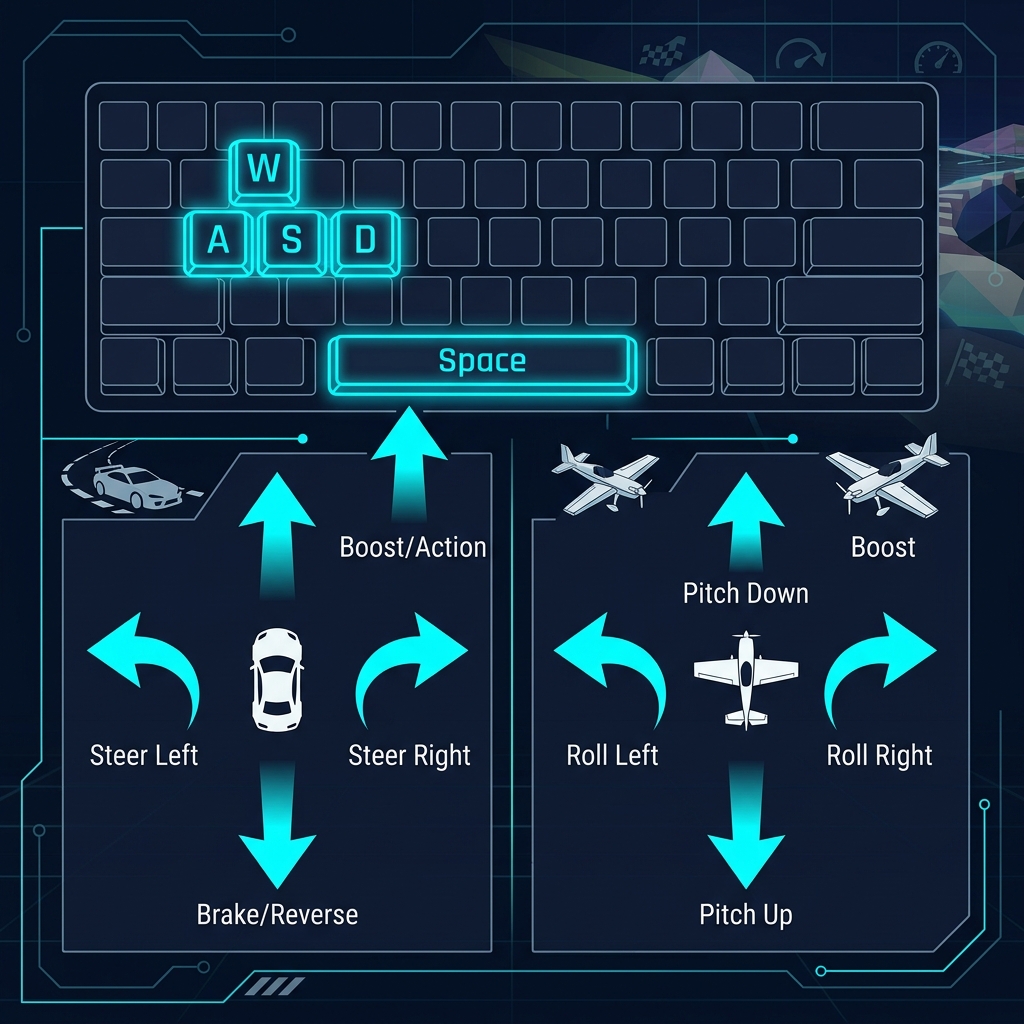
Pro tip: Most experienced players use WASD rather than arrow keys. The left hand handles all driving inputs while the right hand stays on the mouse for camera control—or hovers near R for quick resets.
PolyTrack rewards momentum. Every wall impact, bad landing, and unnecessary brake tap bleeds speed that takes seconds to recover. The best drivers aren't the ones who go fastest in a straight line—they're the ones who lose the least speed through corners and jumps.
The Racing Line
The shortest path through a corner is not the fastest. The fastest path is the one that lets you carry the most speed.
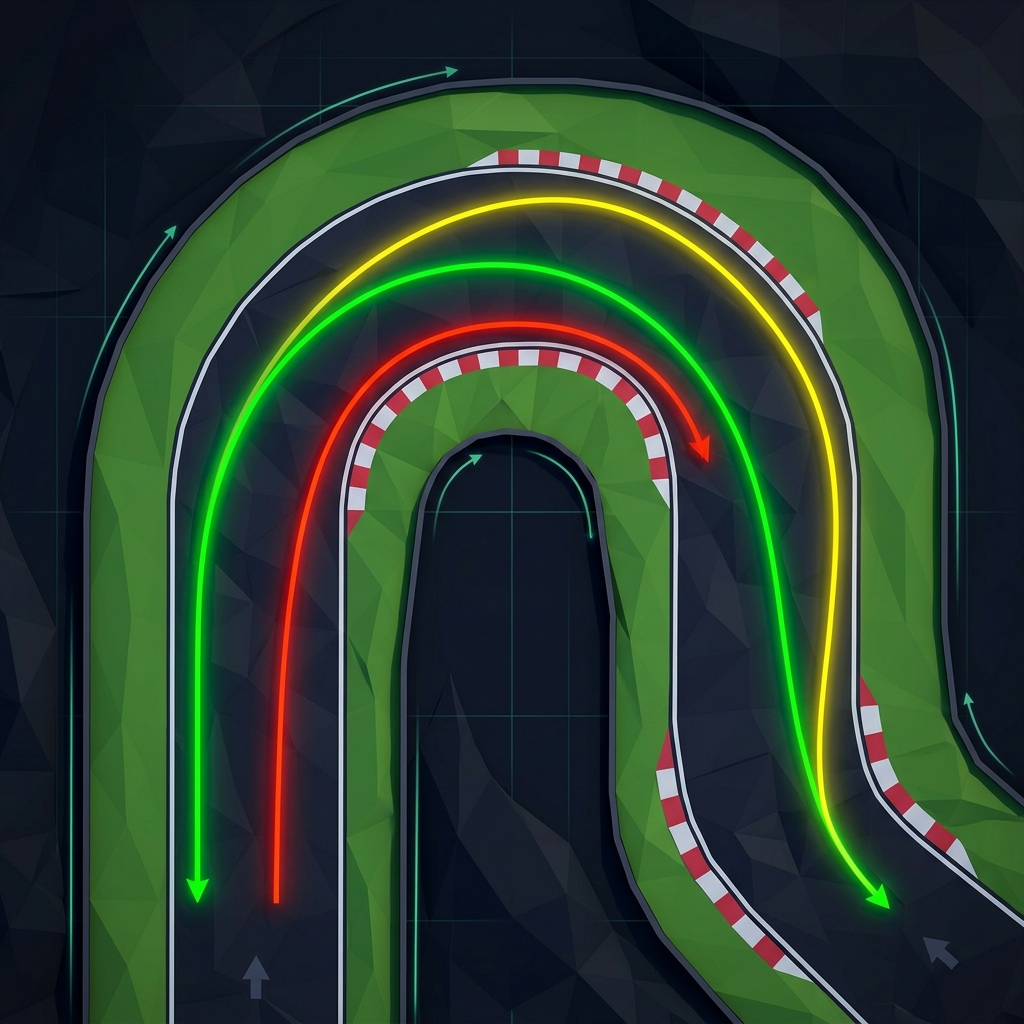
The Out-In-Out principle:
- Approach from the outside of the turn (the wide edge of the track).
- Cut to the inside at the apex (the tightest point of the corner).
- Exit toward the outside again as the road straightens.
This "straightens out" the curve, letting you carry higher speed through what would otherwise be a tight turn. On tracks with guardrails, you can feel the difference immediately—a clean racing line through a 90-degree bend is 0.5 to 1.0 seconds faster than hugging the inside wall.
When to Brake (And When Not To)
New players brake too much. The instinct from real driving is to slow down before every turn. In PolyTrack, many corners can be taken at full throttle with the correct angle of approach.
Rules of thumb:
- Wide, banked turns: No brake needed. The banking provides grip. Trust it.
- 90-degree corners on flat ground: Lift off the throttle (release W) and steer. Don't brake unless you're about to hit a wall.
- Hairpins (180-degree turns): This is where you brake. Tap S briefly before the turn, then power through.
- Chicanes (S-curves): The trick is rhythm. Tap-steer left, tap-steer right, never full-lock in either direction.
Drifting Basics
Drifting is not just for style—it's a core mechanic for tight corners that can't be taken with steering alone.
How to initiate a drift:
- Approach the corner at speed.
- Steer into the turn direction (A or D).
- Tap Spacebar to break rear traction.
- Counter-steer slightly to hold the slide angle.
- Release the turn key to grip up and shoot forward.
When to drift: Only on corners too tight for normal steering. Drifting always costs some speed—a clean cornering line without drifting is faster. Drift only when the geometry forces it.
For advanced drift techniques, see our dedicated Drift Techniques Guide.
You will spend a surprising amount of time airborne in PolyTrack. Ramps, drops, launches, and freefall sections appear on almost every track. And here is the brutal truth: what you do in the air determines more of your lap time than what you do on the ground.
A perfect landing preserves 90-100% of your speed. A bad landing can kill 50%. Over a track with 5 jumps, that's the entire gap between your time and the world record.
The Golden Rule of Landing
Match your car's angle to the landing surface.
If the landing ramp slopes downward at 30 degrees, your car should be pitched 30 degrees nose-down at the moment of contact. All four tires hit simultaneously. Speed is preserved. The run continues.

The Three Priorities (In Order)
- Fix roll first. If your car is tilting sideways, correct that before anything else. A side landing is catastrophic.
- Adjust pitch. Use W (nose down) or S (nose up) to match the landing surface angle.
- Set yaw before takeoff. You can't efficiently spin the car flat (like a top) in mid-air. If you need to face a different direction after landing, pre-steer slightly before you leave the ramp.
Common Air Mistakes
- Over-rotating: Holding W too long and flipping past the correct angle. Use short taps, not sustained holds.
- Ignoring roll: Focusing on pitch while a subtle sideways tilt worsens. Fix roll first.
- Panic inputs: Mashing every key when spinning out makes everything worse. If recovery isn't possible, reset (R) and move on.
For the complete air physics breakdown, read our Air Control Masterclass.
PolyTrack in 2026 offers significantly more than just "drive fast on a track." Here's what's available:
Official Tracks
The game ships with 17 official tracks across three environments:
| Environment | Tracks | Characteristics |
|---|
| Summer | 7 (Summer 1-7) | Green grass, mild conditions, best for learning |
| Winter | 5 (Winter 1-5) | Snow and ice, reduced grip, requires adapted techniques |
| Desert | 5 (Desert 1-5) | Sand and heat, unique visual challenges |
Start with Summer 1. It's the tutorial track—short, forgiving, and designed to teach basic mechanics. Progress through Summer 2-3 before attempting Winter or Desert environments.
Community Tracks
Many player-created tracks exist, ranging from gentle cruises to physics-defying challenges. You can browse and import a curated set from our track library.
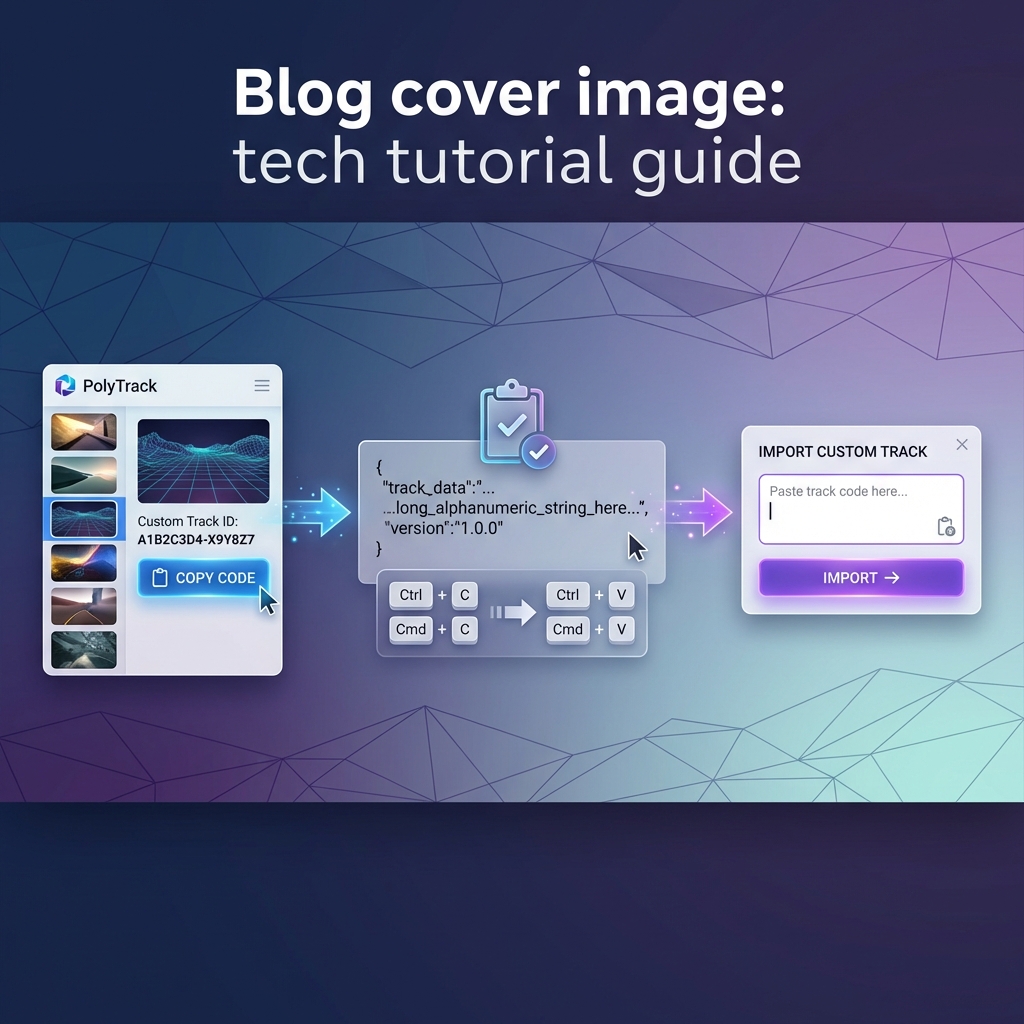
How to import a community track:
- Find a track on PolyTrackCodes.com and click "Copy Code."
- Open PolyTrack and go to Custom Tracks → Import.
- Paste the code (Ctrl+V / Cmd+V) and confirm.
- The track appears in your custom tracks list instantly.
Multiplayer (0.6.0+)
Real-time racing against other players. No physical car contact (cars pass through each other)—it's a pure test of speed execution.
Quick start:
- Main Menu → Multiplayer
- Create Room (you get a shareable code) or Join Room (enter someone else's code)
- Host selects the track, everyone races simultaneously
For competitive strategies, read our Multiplayer Guide.
Community Challenges (Not a Released 0.7.0 Mode)
PolyTrack 0.7.0 has not been released, and the official devlog does not confirm built-in Campaigns or Weekly Shorts modes. Players do organize community-run challenges, including the independent Weekly Campaign. Treat those events as community activities, not official game modes.
Track Editor
PolyTrack's built-in editor lets you create and share your own tracks. It's approachable enough for a first-timer to build a simple circuit in 5 minutes, yet deep enough for master creators to spend hours perfecting complex designs.
Don't try to jump into Expert tracks on day one. Here's a recommended path that builds skills systematically:
Stage 1: Basic Competency (First 1-2 Hours)
Goal: Complete all 7 Summer tracks.
- Focus on finishing, not on time.
- Learn when controls switch between ground and air mode.
- Get comfortable with the Reset key (R)—you'll press it hundreds of times.
- Don't drift yet. Use wide, sweeping turns instead.
Stage 2: Technique Building (Hours 2-10)
Goal: Beat the "Author Time" (developer's benchmark) on Summer 1-3.
- Start studying the racing line (Out-In-Out).
- Practice deliberate air control on jumps—land flat, not nose-first.
- Try drifting on one tight corner per track. See how it feels.
- Watch ghost replays of players faster than you. Study their lines.
Stage 3: Environment Adaptation (Hours 10-25)
Goal: Complete all Winter and Desert tracks.
- Winter ice reduces grip dramatically. Brake earlier, steer smoother.
- Desert heat creates visual haze—learn to read the track ahead despite reduced visibility.
- Start importing community tracks to experience diverse designs.
- Try multiplayer with friends.
Stage 4: Competitive Play (Hours 25+)
Goal: Crack the top 100 on any official track leaderboard.
- Analyze world record replays frame-by-frame using the replay speed graph.
- Optimize specific sectors, not entire tracks—find the 2-3 corners where you lose the most time.
- Use the community: Reddit r/PolyTrack, Discord servers, and speedrun.com leaderboards.
- Create your own tracks to deepen understanding of geometry and physics.
After any run, you can watch a replay of your drive with an advanced graph window showing speed, inputs, and checkpoint splits. This is one of the most underutilized tools in the game.
How to use replays effectively:
- Complete a run and open the replay viewer.
- Look at the speed graph—the biggest dips correspond to corners or landings where you lost the most time.
- Focus practice on those specific moments.
- Race against ghost replays from the leaderboard to see exactly where faster players diverge from your line.
- Use single-frame stepping (added in 0.6.0) for precision analysis on critical jumps.
PolyTrack's community is one of the friendliest in gaming. Here's where to find help, tracks, and competition:
- PolyTrackCodes.com — A curated library of community tracks with difficulty ratings, descriptions, and one-click import codes.
- r/PolyTrack — Reddit community for sharing tracks, discussing strategies, posting world records, and organizing events.
- Discord — Multiple community servers focused on different aspects (speedrunning, track creation, casual play). Links available on itch.io and Reddit.
- speedrun.com/polytrack — Official speedrunning leaderboards with verified records and category rules.
- itch.io — kodub.itch.io/polytrack — the developer's home base for updates, devlogs, and community discussion.
Q: Does my car choice affect performance?
A: Currently, all car types in PolyTrack handle identically. The differences are purely cosmetic—paint patterns, rims, and exhaust styles don't change speed, grip, or weight.
Q: How do I save my progress?
A: PolyTrack saves data to your browser's local storage automatically. Be careful when clearing browser data—you could lose replays, custom tracks, and personal bests. Back up important track codes externally.
Q: Why can't I connect to multiplayer?
A: Common fixes: (1) Hard refresh the page (Ctrl+Shift+R). (2) Try Chrome instead of Firefox/Safari. (3) Disable VPN—it can block WebRTC connections. (4) Check if your firewall allows browser peer-to-peer networking.
Q: Is PolyTrack really free? No hidden costs?
A: Completely free. No ads on the itch.io version, no microtransactions, no battle passes, no premium content. The CrazyGames version has ads to support server costs, but all gameplay features are identical and free.
Q: The game runs slowly on my computer. What can I do?
A: Close other browser tabs (especially YouTube, Twitch). Reduce the browser window size. In-game settings may offer shadow/reflection quality options—set them to Low. Chrome generally performs best for WebGL games.
Q: I'm stuck on a track. How do I skip it?
A: You can play any official track in any order—there's no progression lock. If a track frustrates you, move to a different one and come back later with improved skills.
Your journey is just beginning. Here are the guides that will take you from beginner to competitive player:
Welcome to PolyTrack. Now go chase a world record. 🏎️