Back to Blog/Guides & Tutorials
Guides & Tutorials

Why PolyTrack Tracks Get Sent Back: Lessons From 239 Reviews

We reviewed 239 community PolyTrack submissions in two weeks. 72% were approved. Here are the most common reasons the rest were sent back, and how to fix each one before you submit.

P
AuthorPolyTrackCodes Team
PublishedOctober 6, 2026
Read Time8 min
Why PolyTrack Tracks Get Sent Back: Lessons From 239 Reviews

Advertisement

The short version

Between September 20 and October 3, 2026, we reviewed 239 community track submissions. 173 were approved (72%), 50 were sent back for changes, and 16 were declined. Almost every track that was sent back could have been approved on the first try with five to ten minutes of extra care.

This is not a guide to the whole submission form. For that, read How to Submit a PolyTrack Track. This article is the other half: what we actually saw go wrong, ranked by how often it happened, so you can check your own submission before you press send.

The numbers

OutcomeSubmissionsShare
Approved and published17372%
Sent back for changes5021%
Declined167%

Of the 66 submissions that were not approved, here is how often each problem appeared in the reviewer note. One submission can have more than one problem, so the shares add up to more than 100%.

ProblemSubmissionsShare of the 66
Cover image does not show the track42about 64%
Title or description is a placeholder25about 38%
Embedded author does not match the submitter16about 24%
Duplicate or earlier version of another submission9about 14%
Copy or remake of someone else's track5about 8%

The pattern is clear: most rejections are not about the track itself. The tracks were fine. The submission around them was not.

1. The cover image does not show the track

This was the single biggest reason, by a wide margin. Players decide whether to import a track by looking at the preview, so the cover has to show the whole route.

What we kept receiving instead:

  • A driving-camera screenshot from inside the game, often with a pause message on screen
  • A low, ground-level view of the landscape where the track is a thin line in the distance
  • A close-up of one building, ramp, or corner
  • A screenshot of a web page, with browser tabs and ads around a tiny editor window
  • A photo, drawing, meme, or game from a different title altogether
  • A fully black or nearly empty image

Here are four real covers we sent back. None of them shows the route, even though each one belongs to a working track:
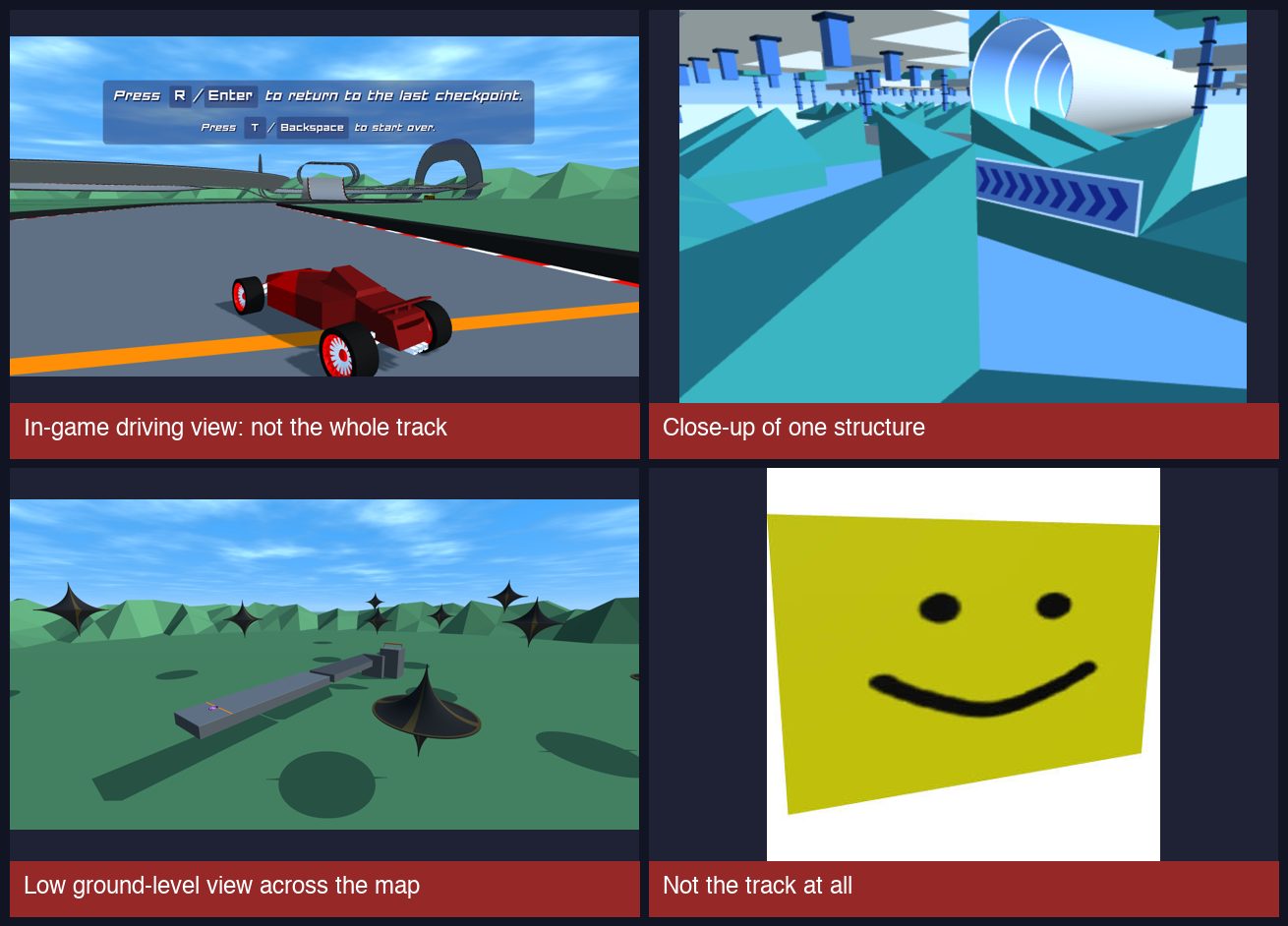
Four submitted cover images that were sent back: an in-game driving view, a close-up of one structure, a low ground-level view across the map, and an image that is not the track

What works every time:

  1. Open the track in the editor.
  2. Zoom out until the whole route is on screen.
  3. Tilt the camera to look from above, or use a top-down view.
  4. Take a plain screenshot and crop away anything that is not the editor view.

Here are four covers that passed on the first review. The camera angle differs, but in every one you can follow the road from start to finish:
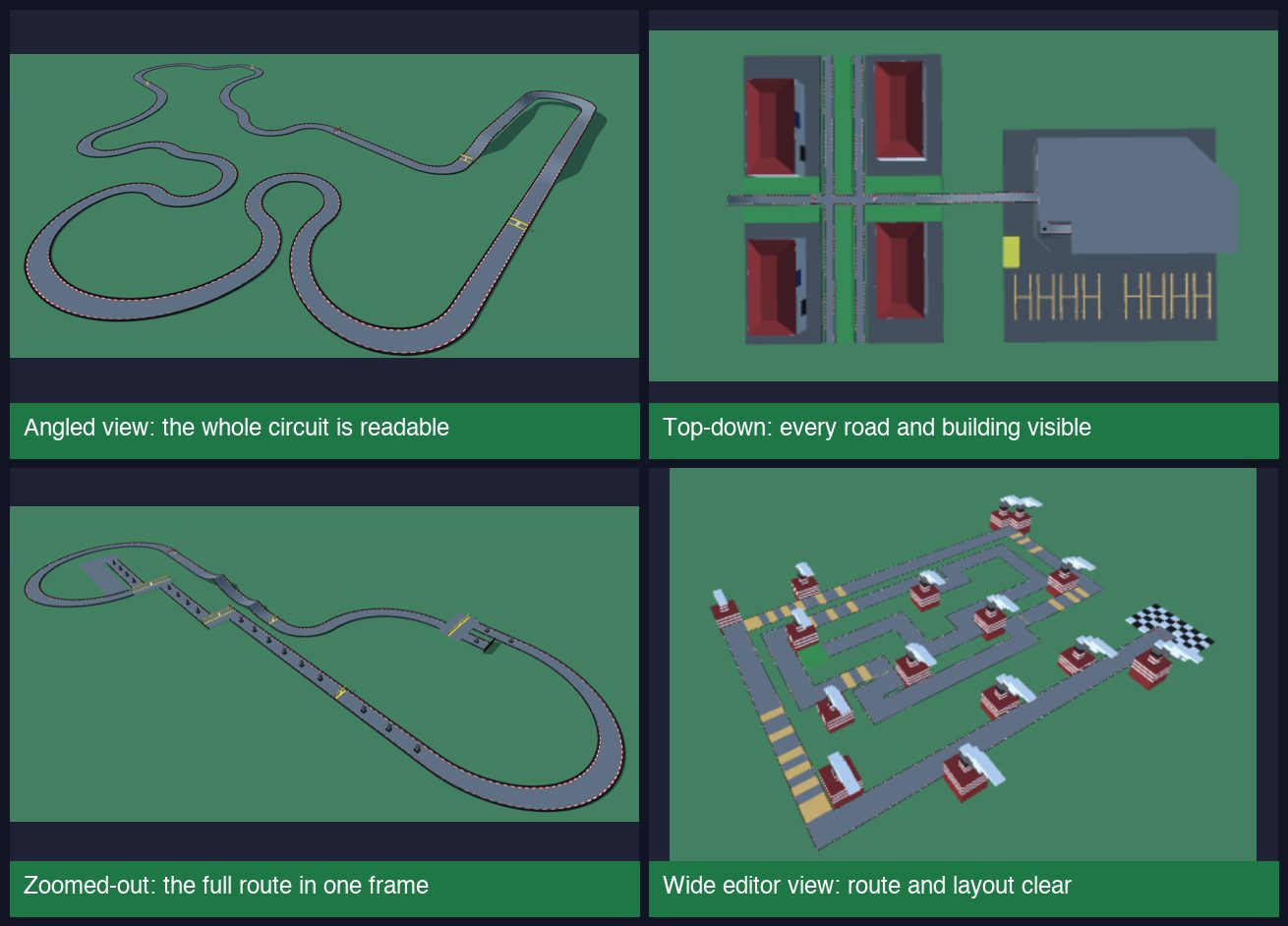
Four submitted cover images that were approved: an angled circuit view, a top-down view, a zoomed-out full-route view and a wide editor view

An angled, zoomed-out editor view is fine. We do not need a perfect top-down map. We need to be able to see where the road goes. If you can tell the route from the picture at a glance, it will pass.

2. Placeholder titles and descriptions

Titles such as "Track", "ez", "test" or a single dot, and descriptions such as "its fun", "go fast" or "Play this", cannot be published. The title becomes the page heading and the web address, and the description is the only text a search engine or a player has to understand the track.

You do not need to write an essay. Two or three concrete sentences are enough:

  • What kind of route it is (circuit, straight run, jump course, maze)
  • The hardest section or the trick it is built around
  • Roughly how long a run takes
  • One driving tip

"A short Hard speedrun with a long straight, a loop, and a narrow final ramp. Hold your speed through the loop or you will not make the ramp" is a better page than anything we could generate on our own.

Advertisement

3. The embedded author does not match you

Every PolyTrack code contains a track name and an author name that were set when it was exported. When the author inside the code is different from the name on the form, we have to ask who really made the track.

This has several innocent causes, and we treat them that way:

  • You exported from a friend's device or a shared school account.
  • You left the author field on the default value.
  • You spelled your own name slightly differently in the form.
  • You built the track while signed in under an older username.

It also covers the cases we cannot publish: official tracks by Kodub, remakes of another creator's track, and uploads of someone else's work. If the author in the code is not you, tell us why in the description. If it is a remake or a modified version of someone else's track, credit the original creator and say what you changed. If the original author says it is fine, we are glad to publish it.

The easy fix: make sure your own name is set as the track author in the editor before you export the code you submit.

4. Duplicates and earlier versions

Creators often submit a track, spot a mistake, and submit it again. That is fine, and we welcome improved versions, but choose the update option and name the track you are improving. If you submit the same layout again as a new track, we have to guess which version is the right one, and we usually publish the newest and close the older one.

A few related things we saw:

  • The same track submitted twice with slightly different names
  • Two layouts that were nearly identical, differing only in a few blocks
  • An update to a track that was still waiting in the queue

For updates, write one line about what changed ("widened the final chicane" or "fixed the skip at checkpoint 2"). It helps us compare versions and it appears on the page.

5. Your email address matters more than you think

We email the review result to every creator. A noticeable number of those emails could not be delivered, and the reason was almost always the same: the address had been suppressed by the mail provider after repeated failed deliveries. School and work addresses are the most common cause, because they often block outside senders or bounce automated mail.

When that happens, the track is still published if it was approved, but we cannot tell you. Use a personal address you check regularly, and keep the status link you receive after submitting.

A pre-submit checklist

Before you press submit, run through this list:

  • I imported my own code into the game and drove it start to finish.
  • The code in the form is the final version, copied completely.
  • The cover image shows the whole route from above, not a driving view.
  • The title is specific and spelled the way I want it displayed.
  • The description has at least two concrete details.
  • The author name inside the code is my own.
  • If this improves an earlier track, I picked "update" and named it.
  • My email is one I actually read.

If you can tick every line, your submission is already ahead of most of the ones we send back.

What happens when a track is sent back

Being sent back is not a rejection. You get a note that names the specific problem, and you can resubmit as often as you like. Fixing the cover image or the description is usually all that is needed.

Declined tracks are the exception: most were duplicates of another submission or copies of someone else's work. Even then, a new submission with a clear cover and an honest description is always welcome.

Recommended next reads

Ready to send your own? Submit your track.

Advertisement

#Submit Track#Review Process#Creator Guide#Cover Image#Community Tracks#Moderation
P
Written by

PolyTrackCodes Team

PolyTrack players & track curators

The PolyTrackCodes Team is a small group of PolyTrack players who curate, import, and test community track codes. We load every track we publish in the game to confirm the code works, tag its category and difficulty from how it actually plays, and write our guides from hands-on experience with the editor and leaderboards.

More about our team

Enjoyed this guide?

Share it with your racing community and help others master the track.

Ready to hit the track?

Take what you've learned and set a new world record on our community's best tracks.

Explore Tracks